Best apps
The 3 best baby food allergy apps for tracking reactions
Most baby food apps are built to tell you what to serve. Fewer help you work out what happened afterwards. We compared the apps that track allergens and reactions on what they record, how they help you spot a pattern, what they cost and where your baby's data goes.
Quick answer
For tracking reactions, our three picks are AllerLog, best for working out which food is behind the bad days; Solid Starts, best for learning how to serve each food and allergen; and BabyPlate, best for following a structured allergen schedule. AllerLog's meal log, scores and charts are free. Solid Starts and BabyPlate sell their full features as subscriptions.
We make AllerLog, so we're not neutral. To keep this useful anyway, each app here is the best at something, we say plainly where the others beat ours, and every fact about the other apps comes from their own App Store listings on the US store. Prices and features change, so check the listing before you subscribe.
How we picked
We only looked at apps that let you keep track of allergens and what happened after a meal, because that's what you need when you're watching for a reaction. Recipe apps and all-in-one baby trackers are in our comparison of baby food apps. For each app we asked:
- What can you record after a meal? A reaction you noticed, or the quieter signs too: sleep, poop and how the meal went.
- Does it help you see a pattern? A list of foods is a start. Noticing that bad nights keep following the same food is the point.
- How does it help with allergens? Reminders, exposure counts or a schedule.
- What does the tracking part cost?
- What does its App Store privacy label say? Each developer fills in its own label, and Apple doesn't verify it.
The three picks at a glance
| AllerLog | Solid Starts | BabyPlate | |
|---|---|---|---|
| Best for | Finding the food behind the bad days | Learning how to serve each food | Following an allergen schedule |
| After a meal you record | How it went, sleep 1–5, poop 1–5, notes | Reactions or sensitivities | Reactions such as rashes, digestive changes and refusals |
| Spotting patterns | A 12-month chart for every ingredient | A log of foods tried and reactions | Food history and exposure counts |
| Allergen help | A check-in 1 hour after a flagged allergen | Allergens introduced step by step in its meal plans | Exposure counts for 9 allergens, new ones spaced 2–3 days apart |
| Food guide | 158 built-in ingredients, no serving guides | 400+ foods with serving guidance by age | 380+ foods with serving guidance by age |
| Sharing with your doctor | Show the charts on your phone; no export | Download the log to share | Share progress with your pediatrician |
| Price for tracking (US) | Free | Paid plans: $19.99 a month or $99.99 a year | Subscription after a free trial |
| Privacy label | Analytics and crash data not linked to you; nothing used to track you | Identifiers and usage data used to track you | Usage data used to track you |
| App Store rating (US) | New | 4.9 | 4.7 |
1. AllerLog: best for finding the food behind the bad days
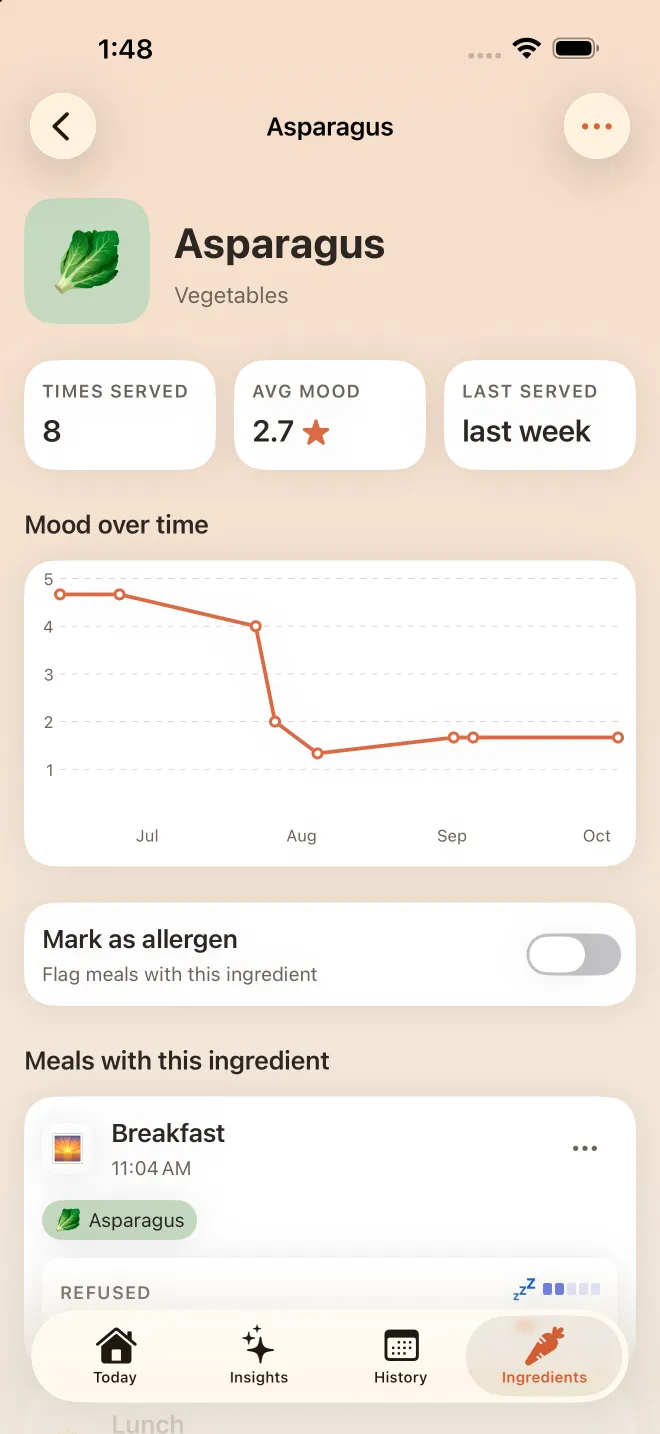
Most of the reactions parents worry about aren't dramatic. They're a run of bad nights, a change in poop, or a baby who suddenly refuses a food they loved. AllerLog is built for those. You log each meal with its ingredients and how it went, from Refused to Loved it, then score sleep and poop from 1 to 5. Every ingredient builds its own 12-month chart from the meals it was in, so a food that keeps lining up with bad days stands out from the rest.
- Price: free.
- Allergens: mark any ingredient as an allergen and AllerLog checks in an hour after you serve it, and three hours after any brand-new food.
- Privacy: no account, and your log is stored on your iPhone.
- Works on: iPhone and iPad with iOS 26 or later, in 28 languages.
Where it shines
- It records the quiet signs, sleep, poop and how the meal went, not only the reactions you happened to spot.
- It charts every ingredient over 12 months, built from the scores of the meals it was in.
- Premium flags possible intolerances: foods averaging 3 stars or less across two or more meals.
Where it falls short
- No serving guides, recipes or meal plans. It's a tracker, not a feeding course.
- No allergen exposure schedule or exposure counts.
- No export: at appointments, you show the charts on your phone.
- It's new, so it has a shorter track record than the other two.
How to track an allergen in AllerLog
- Flag the allergenCommon allergens such as peanut, egg and dairy are already flagged. For anything else, open the ingredient and switch on Mark as allergen.
- Log each time you serve itPick it from the 158 built-in ingredients, set the time and tap how the meal went.
- Answer the check-inAn hour later AllerLog reminds you to check on your baby and note anything you saw. Score sleep and poop when you can.
- Read the chartOpen the ingredient to see how many times it's been served and how its meals went over time.
2. Solid Starts: best for learning how to serve each food
Solid Starts is the best-known starting solids app, rated 4.9 on the US App Store. Its free First Foods database covers more than 400 foods, each with choking and allergen guidance, how to cut and serve it at each age, and videos of real babies eating. Upgrading unlocks the rest: guided meal plans through the first 100 foods with allergens introduced step by step, 300+ recipes, and a tracker where you log foods and reactions or sensitivities, which you can download to share with doctors.
- Price: the database is free. The paid plans are $19.99 a month or $99.99 a year in the US, with a free trial.
- Allergens: introduced inside its meal plans, with serving sizes and what a reaction looks like.
- Privacy: its label lists identifiers and usage data used to track you, and contact info such as your name and email linked to you.
- Works on: iPhone and iPad with iOS 16.4 or later.
Where it shines
- The most complete guide to what to serve and how, written by a team that includes pediatricians, feeding therapists, an allergist and a dietitian.
- A reaction log you can download for your doctor.
- It runs on older iPhones.
Where it falls short
- The tracker comes with the paid plans; the free part is the database.
- It records the reactions you noticed rather than scoring sleep and poop after every meal.
Weighing up these two? Read our full AllerLog vs Solid Starts comparison.
3. BabyPlate: best for following an allergen schedule
BabyPlate is the most structured of the three about allergens. It counts how many times your baby has had each of nine common allergens (peanut, egg, dairy, wheat, soy, fish, shellfish, tree nuts and sesame), spaces new allergens 2 to 3 days apart, and logs reactions such as rashes, digestive changes and refusals. It also has a 380+ food database with serving guidance by age, weekly meal ideas, and halal, kosher, vegan and vegetarian filters.
- Price: free to download with a free trial. After that, the app needs a paid subscription; the US store lists plans from $5.99 a week to $79.99 a year.
- Allergens: exposure counts for nine allergens and 2–3 day spacing between new ones.
- Privacy: its label lists usage data used to track you.
- Rating: 4.7 on the US App Store.
Where it shines
- The best fit if your pediatrician or allergist has given you an exposure plan to keep up.
- You can share progress with caregivers and your pediatrician.
- Halal, kosher, vegan and vegetarian filters built into its suggestions.
Where it falls short
- Everything needs a subscription once the trial ends.
- It's built around the allergen plan rather than tying every meal to sleep and poop.
Also worth a look
- First Bites tracks how many days have passed since each allergen, with guidance vetted by board-certified allergists and a weekly view of food variety. Its recommended allergen schedules stay free; tracking is $5 a month or $48 a year after a 14-day trial, or $150 once for unlimited child profiles.
- Tummi has 400+ foods with prep instructions and photos, an AI chat for feeding questions, and a log for foods, reactions and milestones. Most of it needs the paid Tummi Full plan after the trial.
- Huckleberry is the all-in-one baby tracker, best known for its sleep predictions, with a solid foods log. Worth it if you already track sleep and feeds there.
- Baby Led Weaning App by Drama Labs has 1,000+ foods and recipes and a food diary that tracks allergen introductions and reactions.
Which one should you choose?
- Something seems to upset your baby and you want to know what: AllerLog. Log every meal for a couple of weeks, then check the ingredient charts.
- You're nervous about how to serve foods safely: Solid Starts, if you're willing to spend $99.99 a year to get its tracker and meal plans as well as the free database.
- You want a reminder after every allergen and new food: AllerLog checks in an hour after a flagged allergen and three hours after a brand-new food.
- You have an allergen plan to follow: BabyPlate, if you don't mind a subscription once its trial ends.
- You'd rather not create an account: AllerLog keeps your log on your iPhone, with no sign-up.
- You mostly want to see the days since each allergen: First Bites, if you're happy to pay $5 a month after its 14-day trial.
Whichever you pick, the record is for you and your pediatrician. An app can't tell you whether your baby has an allergy, but a clear log makes that conversation much easier. Our guide to tracking baby food allergies covers what to write down.
Frequently asked questions
Is there an app that tracks baby food allergies?
Yes, several. AllerLog, Solid Starts, BabyPlate, First Bites and Tummi all let you log foods and keep track of allergens. They differ in what comes next: AllerLog scores sleep and poop after every meal and charts each ingredient, BabyPlate counts allergen exposures, and Solid Starts pairs its log with serving guides.
Which app is best for introducing allergens?
For a structured plan, BabyPlate counts exposures for nine common allergens and spaces new ones 2 to 3 days apart, and First Bites tracks how many days have passed since each allergen. AllerLog doesn't schedule exposures; it checks in an hour after a flagged allergen so you can record how it went. Your pediatrician or allergist should set the plan itself.
Is there a free baby food allergy tracker?
AllerLog's meal log, sleep and poop scores, ingredient charts and allergen check-ins are free, with optional Premium insights. Solid Starts' food database is free, but its tracker comes with its paid plans. First Bites keeps its recommended allergen schedules free after its 14-day trial.
Can an app diagnose a food allergy?
No. An app helps you keep a clear record to show your pediatrician or allergist; a diagnosis needs a doctor and sometimes testing. If your baby has trouble breathing, swelling of the face or tongue, or repeated vomiting after eating, call your local emergency number.
Sources & further reading
- Starting Solids, BLW: AllerLog — App Store (US)
- Solid Starts: Baby First Foods — App Store (US)
- Solid Starts app plans and features — Solid Starts
- BabyPlate: Starting Solids — App Store (US)
- First Bites: Baby food tracker — App Store (US)
- Tummi – Start Solid Foods — App Store (US)
- Huckleberry: Baby Tracker — App Store (US)
- Baby Led Weaning App – BLW — App Store (US)
AllerLog is a tracking and journaling tool that helps you and your pediatrician spot patterns. It is not a medical device and does not diagnose, treat or prevent any condition. This page is general information, not medical advice: always talk to a qualified healthcare professional about your child's diet, allergies and health. If your child has trouble breathing, swelling of the face or tongue, widespread hives, repeated vomiting or becomes floppy or pale after eating, call your local emergency number straight away.